

CMI Usage Guide
New Researcher Registration Procedure
The principal investigator (PI) first registers the researcher in the Research Management System (CRIS), after which the required documents are prepared and submitted.
Access the Research Management Program
- Access the Research Management Program (cris.snuh.org)
- Principal investigator login
Register the new researcher
- Menu → Researcher Management → New Registration
- Enter information → Save → Print the entered details
Attach documents to the printout
- Résumé (attach one 3 cm × 4 cm photo)
- Health examination result
PI and applicant signature
- Stamp or signature of the principal investigator and the applicant on the completed documents
Submit to the Research & Laboratory Team
- Medical Research Innovation Center (CMI), 2nd floor, Room 2302
- Submit to the Research & Laboratory Team office
Health Examination upon Hiring Resident Researchers at the Biomedical Research Institute (BRI)
To protect the health of researchers contributing to the advancement of medical research and to ensure laboratory work safety, a health examination has been conducted upon hiring (pre-employment health screening) since July 1, 2016.
Eligibility
Clinical faculty researchers resident at the Medical Research Innovation Center
(excluding hospital-employed research professors, fellows, residents, and non-resident researchers)
Examination location
External hospital
Examination items
Based on the civil-servant employment physical examination standard
Examination fee
Paid by the individual
Contact
Research & Laboratory Team
02-2072-1888
Other application documents to submit to the Research & Laboratory Team (CMI, 2nd floor, Room 2303)
A document issued by the hospital HR department, available at the Research & Laboratory Team office
KRW 2,000 per key / KRW 10,000 locker deposit required; available at the Research & Laboratory Team office
Request via Groupware → Document Drafting → Compose → Personal Device IP Use Application
CMI Access
| Category | Access method |
|---|---|
| Resident researcher |
Download the mobile researcher ID (QR code) for access · ID: the researcher's personal number registered in the Research Management System (CRIS) · PW: YYMM |
| Research professor / Staff | Access with an employee ID card |
| Visitor (vendor / laboratory visit) |
The requester (professor or researcher) pre-registers in the SNUH Biomedical Research Institute access control system, then enters with a QR code at the 1st-floor information desk Users of the special shared instrument room and shared equipment room should contact the person in charge Other operational suggestions and inquiries: Research & Laboratory Team (02-2072-1888) Accounts with no entry for 3 months are automatically deleted from the access control system |
QR Code Download Guide
After completing the researcher registration procedure (document submission complete), you can download the CMI mobile researcher ID (access QR) to enter CMI.
Access the store
- iOS: App Store
- Android: Google Play
Download the app
- Search for “Seoul National University Hospital Researcher Access Pass”
- Download the app
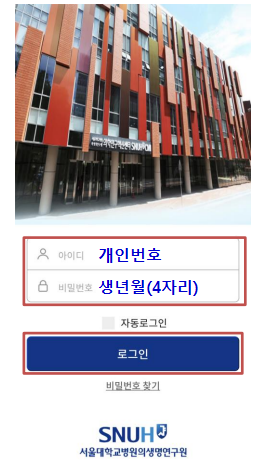
Log in
- Log in with your personal ID and PW
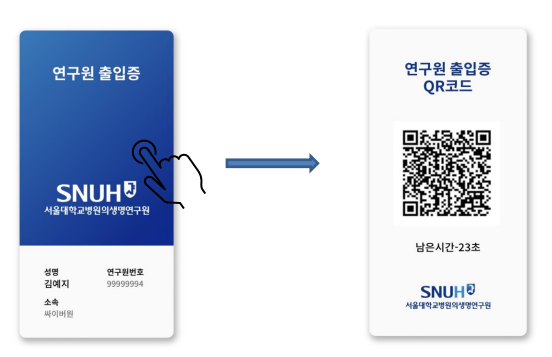
Activate the QR
- Tap “Researcher Access Pass”
- Activate the QR code and enter
Employment Certificate Application Procedure
The researcher applies for the employment certificate directly by accessing the Research Management Program (CRIS); after the principal investigator's approval, it can be printed.
Website login
- The researcher accesses and logs in to the Research Management Program (cris.snuh.org)
- ID: researcher's personal number
- PW: last 7 digits of the resident registration number
Apply for the employment certificate
- Click Employment Certificate → apply to the principal investigator
- An approval request email is sent to the principal investigator
PI approval
- The principal investigator approves the application
- An approval notification email is sent to the researcher
Verify and print
- The researcher checks the application status
- If the status is [Approved], the employment certificate can be printed
Resignation (Resident Researchers)
Resignation of resident researchers can be processed in the following two ways.
- Online (http://cris.snuh.org): the principal investigator processes the resignation directly
- Submit a resignation letter (Research & Laboratory Team, Room 2303) → return ID card, key, locker, etc. → refund of any remaining deposit